1. Inspect & map
See what the file uses now and choose what replaces it. Suggest exact matches between folders such as Legacy/ and Client/, or map renamed assets yourself.

For designers inheriting someone else's file
Replace Figma variables, styles and compatible components with a plan you can check. Reuse your mappings on the next file. Leave a readable record for the handover.
Submitted to Figma Community for approval. Inspect and preview free. Pro: $19 USD once. No subscription.
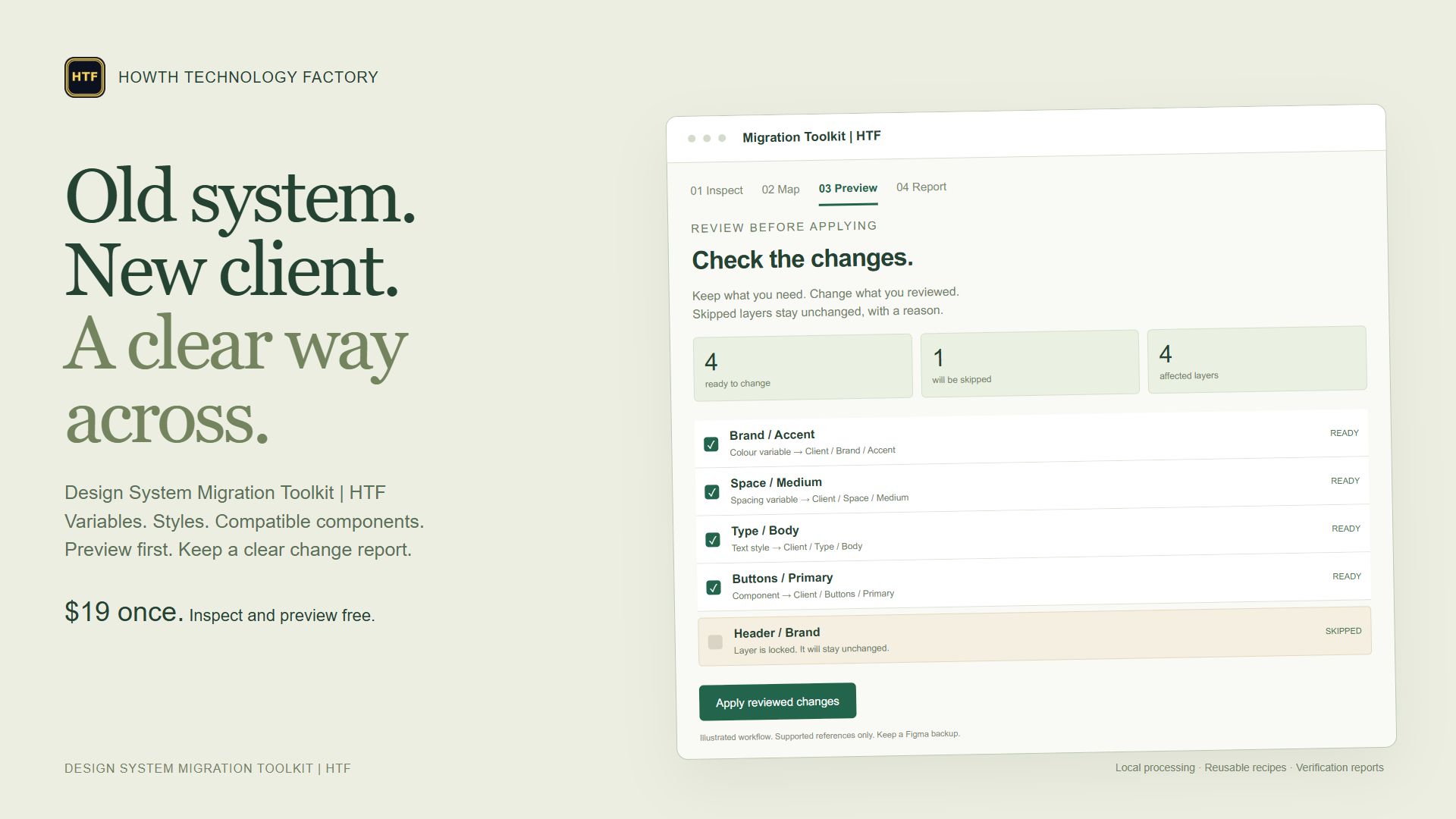
Start with selected frames, the current page or the entire file. The plugin finds supported references and builds a preview before you apply a migration.
See what the file uses now and choose what replaces it. Suggest exact matches between folders such as Legacy/ and Client/, or map renamed assets yourself.
Check each proposed change. Exclude individual rows. Locked layers, incompatible targets and unsupported component structures are skipped with a reason.
Read the verified-change report and remaining mapped-reference count. Export HTML or JSON, or restore recorded properties before making later document edits.
Save or export your mapping recipe. Capture published target-library keys and reuse them across accessible files. Export captured variables as JSON/CSS and generate an editable reference page for the handover.
Supported variable bindings, optional local aliases, solid colours and spacing/radius values. Review raw values carefully: identical colours and numbers can have different meanings.
Paint, text, effect and grid style references. Font checks and conservative text-override handling help catch problems before applying changes.
Flat, matching structures with supported text and boolean properties. Complex nested instances, slots, scaled instances and unsupported overrides stay unchanged.
Free: inspect, map and preview supported changes. Pro, $19 once: apply migrations, save recipes, export captured variables as JSON/CSS and create an editable guide. Existing reports, recovery and saved-recipe deletion remain accessible without Pro.
Processing runs inside Figma. No HTF account, external API key or separate subscription. Figma provides installation, library imports and native checkout.
No. It migrates recognised supported references in your chosen scope. Main component contents and locked layers are excluded from layer changes. Component swaps require compatible flat structures; text-content and font-identity bindings are excluded. It does not promise every override, prototype or library dependency will transfer. Review the preview and keep a duplicate/version backup.
Inspect that library file and capture its target keys, then inspect the design file and map to those targets. The library must be published and accessible. You explicitly allow loading published definitions during preview. Figma plan and library permissions apply. Imported definitions remain in the document after restoring a run.
The plugin attempts guarded restoration of recorded properties and reports any failures. Keep Figma and the plugin open during the run. Restore is available only in the current session until the document changes again. The recovery record is a reference download, not a full-file backup or importable restore script.
Up to 25,000 layers, 3,000 assets, 200 mappings and 5,000 operations per run. Incomplete inspections cannot apply. Use smaller selections for large files. Up to 20 saved recipes within 2 MB; imported recipe/target files must be under 2 MB. Editable guides include up to 100 local assets. Creating a guide adds a page, so Figma’s page limits still apply.
JSON retains captured variable modes and aliases. CSS uses the first mode, does not infer numeric units and omits aliases it cannot safely represent. Name collisions are reported. The editable reference page is static, not a synced library.
The interactive demo is available now. Submitted to Figma for review on 28 October 2026 at $19 USD one-time for Pro. Public purchases are not available yet; Figma must approve the listing. The Figma link may be restricted while review is pending. This website has no checkout.
The plugin allows no network domains and contains no analytics, AI calls or external API service. Figma provides document access, native asset imports, client storage and payment. “Local” refers to plugin processing; Figma has its own connection requirements. The plugin receives payment status, not card details.
Saved recipes and target packs stay in Figma clientStorage on this client. Delete saved recipes or clear the target pack in Recipes & targets. Downloads can contain private layer/asset names, IDs and values. Review before sharing. Reports and recovery records are held in memory for this plugin session. Nothing is automatically sent to HTF.
The browser demo uses fictional data and simulated operations, with state held in memory until refresh. It does not connect to a Figma file or process payment. The demo has no analytics. This marketing page uses Google Analytics under the website privacy notice.
Email apifymcpfactory@gmail.com with your plugin version, Figma environment, scope and a redacted report or small sample file. Do not send passwords, tokens or confidential production designs.
For a privacy request, identify the product and type of data without sending the data itself. You can also use the contact page.
An independent Agentic Systems Studio | HTF product. Figma is a trademark of Figma, Inc. No affiliation with competing plugin vendors.