· PDF automation · 8 min read
Before automating PDF work, define the boundaries
“Merge these PDFs” sounds like one operation. In a production workflow it is a chain of decisions about where files come from, what may be fetched, how pages are addressed and what happens after the result is produced.
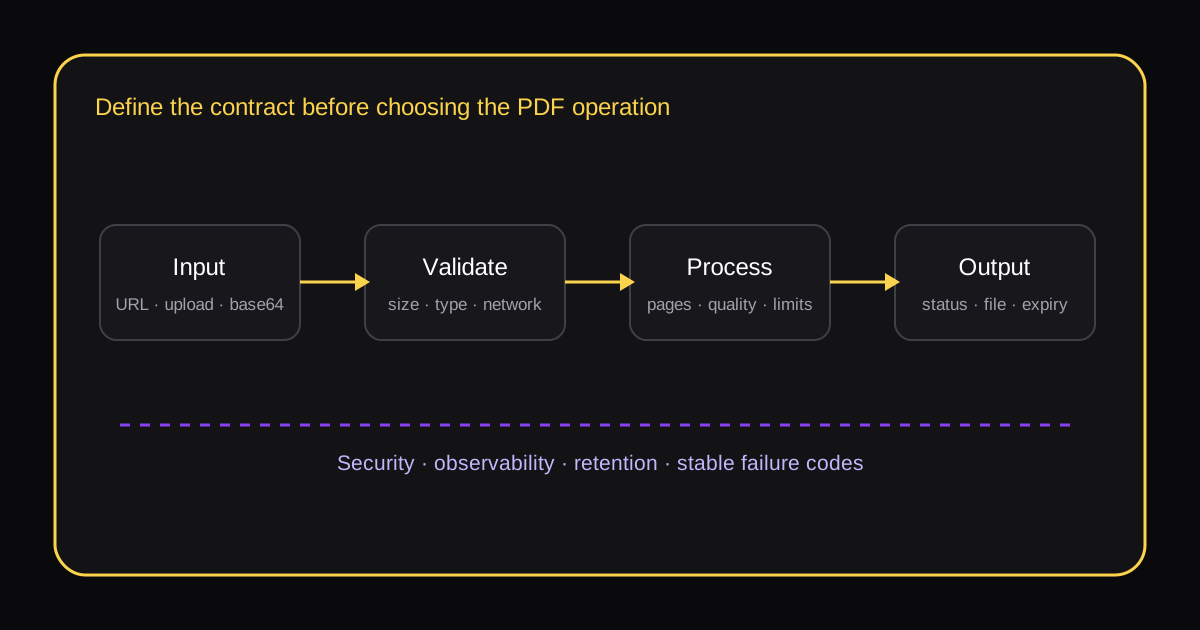
A library comparison often starts with feature rows: merge, split, compress, convert. Those rows matter, but they do not tell you whether the finished workflow will behave safely and predictably. Two services can both “support splitting” while disagreeing about page numbering, invalid ranges, encrypted files and partial success.
Write the contract first. It makes product evaluation faster because vague capability claims turn into questions that can be tested.
1. Decide how a file may enter the system
A public URL, a pre-signed URL, an uploaded file and a base64 string create different operational constraints. URL input is convenient for agents, but it also creates a network request controlled by someone else. Uploads avoid remote fetching, but require transport and size limits. Base64 increases the payload and can be awkward in logs.
State the accepted input forms, maximum bytes, permitted MIME types and behavior when the extension disagrees with the file signature.
2. Treat remote fetching as a security boundary
If the processor accepts URLs, define redirect limits, timeouts, maximum download size and which address ranges it may contact. A fetcher should not quietly become a route to private network services. Decide whether DNS is checked again after redirects and whether the response must be a PDF before it is stored.
3. Make page semantics explicit
Humans usually count pages from one; many programming interfaces count from zero. A range such as 2-4 can mean three pages, a half-open interval or an invalid expression depending on the tool. Define numbering, inclusive or exclusive endpoints, duplicate-page behavior, ordering and the result of an out-of-range request.
4. Define what “compress” is allowed to change
Lossless structural cleanup and image recompression are different operations. Image recompression may change resolution, introduce artefacts or make scanned text harder to read. Record whether quality can change, what target is used and whether the original is preserved. A smaller file is not automatically a better result.
5. Specify a useful output contract
A download link alone is fragile. A workflow benefits from a stable status, output location, byte size, page count, processing duration and machine-readable error code. If a batch contains one bad item, decide whether the entire batch fails or returns per-item outcomes.
6. Set retention before processing begins
Temporary files have a lifecycle even when nobody calls them a database. Define where inputs and outputs are held, when they expire, whether logs contain filenames or URLs, and who can retrieve the result. A deletion promise should describe both the file and any derived artefacts.
7. Put hard limits around the job
Limit files per request, bytes per file, total bytes, pages, run time and extracted text. Publish the failure behavior for every limit. Predictable refusal is easier to automate than a process that slows down until the caller times out.
8. Know when the workflow needs a specialist
OCR, digital signatures, interactive forms, redaction and archival standards are not ordinary merge-and-split work. If they are in scope, evaluate them separately. If they are not, make that boundary visible so a caller cannot mistake a successful file conversion for preservation of every document property.
A compact evaluation sequence
- Write three representative input examples, including one failure.
- Define the network and file-size policy.
- Write expected page-range and batch behavior.
- Choose acceptable quality changes.
- Define success and failure payloads.
- Set storage and deletion times.
- Test the limit cases before the happy path is wired into a larger automation.
The result is a testable contract. Only then is it useful to compare implementations.